Music Player Video Template
Cover, track info and audio bars in landscape, vertical, portrait or square
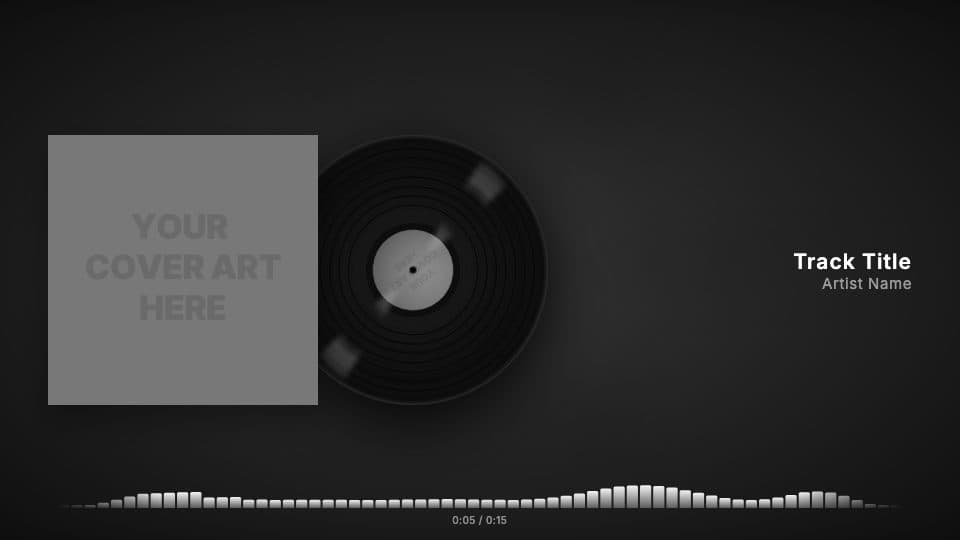
The Player template shows your song the way a music player would: the cover art, a vinyl or CD that spins next to it, your track info and an audio visualizer that reacts to the music, with a progress bar and the time.
It plays your whole track, so it works as a full-length YouTube upload as well as a short clip. In visuale you add your cover and audio, choose the visualizer and export in landscape, square or 4:5.
- 16:9
- 9:16
- 4:5
- 1:1
Classic Player at a glance
- Formats
- 16:9 (1920 × 1080), 9:16 (1080 × 1920), 4:5 (1080 × 1350), 1:1 (1080 × 1080)
- Best for
- YouTube · Stories, Reels, TikTok · Instagram post
- Length
- Follows your track
- Frame rate
- 30 fps
- You need
- Cover art + audio (MP3, WAV, M4A or AAC)
- Software
- Your browser. Nothing to install
What's in the template
Vinyl and CD modes
Show the sleeve alone, slide a record out of it, or spin the cover as a vinyl or a CD.
Audio-reactive visualizer
Bars, mirrored bars, wave, dots or a minimal progress line, all driven by your actual track.
Track info and time
Title, artist and an elapsed / total time counter, styled with your own fonts.
Three formats
16:9 for YouTube, 1:1 and 4:5 for Instagram, from the same project.
How to use it
- 1
Add your cover and track
Upload your artwork and an MP3, WAV, M4A or AAC file, and write your title and artist name.
- 2
Make it yours
Change fonts, colors, animations and background, and pick the format for where you will post it.
- 3
Export and post
Download the video and share it on Instagram, TikTok, YouTube or wherever your fans are.
When to use it
YouTube uploads
Publish the full song as a visualizer video instead of a still image.
Instagram feed posts
Export a square or 4:5 version that fills the feed.
Previews and snippets
Share a section of an unreleased track with a moving visual instead of a screenshot.
FAQ
How long can the video be?
It follows your track, so it can be as long as the song.
Does the visualizer react to my song?
Yes. The bars are computed from the audio you upload, frame by frame.
Which formats can I export?
Landscape 16:9 (1920 × 1080), square 1:1 and portrait 4:5 (1080 × 1350).
Can I use my own background?
Yes. Use a blurred copy of the cover, upload an image or a video, or pick one from the free library.
Guides for this template
Make your Classic Player video
Drop your cover, add your track and export in a couple of minutes.
Use this template