You Don't Need After Effects Templates to Make a CD Player Visualizer Video
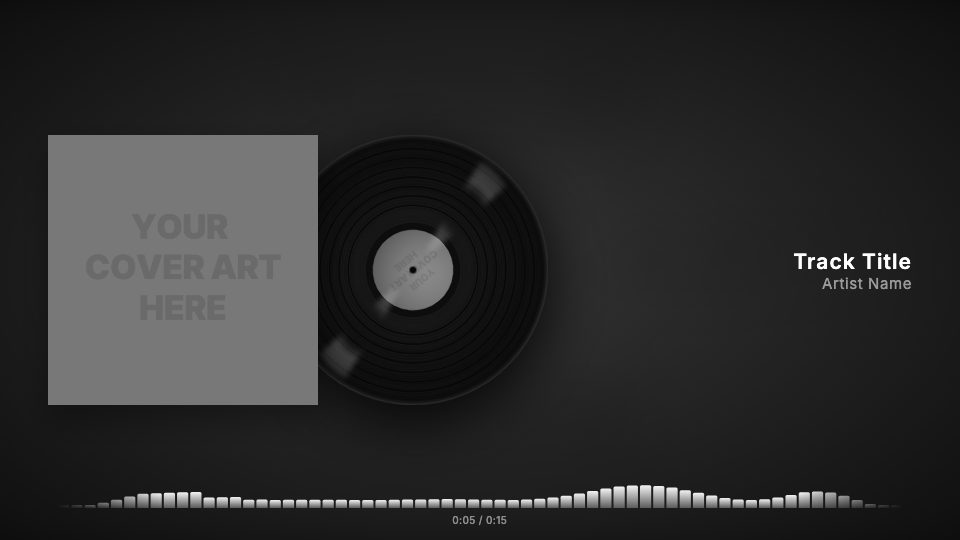
Your cover printed on a turning CD, with bars that mirror above and below a center line as the track plays.
The usual route to a spinning CD visual is a mockup pack from a template marketplace: a disc layer you have to mask your artwork onto, a rotation keyframe you adjust until it stops looking too fast, and a separate audio spectrum effect bolted on underneath. Then you render it at full length on your own machine.
The CD Player look in visuale does the masking, the spin and the visualizer for you. Your artwork becomes the face of the disc, it turns at an unhurried pace for the whole song, and a mirrored visualizer reacts to the audio below it.
You never touch a keyframe. Upload two files, type two names, export.
No After Effects, no plugins, no download.
After Effects template vs visuale
| After Effects template | visuale | |
|---|---|---|
| Putting art on the disc | Mask and pre-compose the cover onto a CD mockup | Your cover is printed on the disc automatically |
| Disc rotation | Keyframe or expression the spin speed yourself | Steady spin built in for the whole track |
| Visualizer | Add and tune an audio spectrum effect | Mirrored bars react to your audio |
| Cost | Adobe subscription plus any paid mockup pack | No Adobe software needed |
| Rendering | Local render as long as the song | Cloud render, then download the MP4 |
| Changing the release | Replace footage and re-render the comp | Upload a new cover and export again |
What the CD Player Visualizer Video looks like
Artwork on a CD
The cover takes the shape of a compact disc instead of a square sleeve, so the release reads as a physical CD at a glance.
Slow, continuous spin
The disc rotates a little slower than the template default, which keeps the artwork readable while it turns.
Mirrored visualizer
Bars grow up and down from a center line in time with the audio, giving a symmetric shape along the bottom of the frame.
Track info and timer
Track title and artist name sit beside or below the disc, and an elapsed and total time counter runs under the visualizer.
At a glance
- Format
- 16:9 · 1920 × 1080 px
- Best for
- YouTube
- Length
- Follows your track
- Also available in
- 9:16, 4:5, 1:1
- You need
- Cover art + audio (MP3, WAV, M4A or AAC)
- Software
- Your browser. No After Effects, no plugins
How to make a CD Player Visualizer Video without After Effects
- 1
Open the CD Player look
The guided editor opens with the disc and the mirrored visualizer already set.
- 2
Add cover and audio
Upload your artwork, which goes onto the disc, and your MP3, WAV, M4A or AAC file.
- 3
Type the names
Enter the track title and artist name. Change the visualizer color or the format if you want.
- 4
Render and download
Export the video. It renders in the cloud and you download the finished MP4.
When to use it
Physical CD announcements
Show fans the release as a disc when you are pressing CDs for shows or a store.
Early-2000s inspired tracks
A spinning CD suits pop-punk, R&B and other sounds that lean on that era.
YouTube full-track upload
Run the disc and visualizer for the whole song in 16:9 instead of posting a still cover.
FAQ
Is there a free CD player After Effects template?
Some CD mockup projects are free, but they need After Effects to customise and render. In visuale the CD Player look is ready to use in the browser.
Can I customise the CD Player look?
Yes. You can change the visualizer style and color, the fonts, the background and the cover mode. The preset is only a starting point.
What sizes can I export?
The Player template exports 16:9 (1920×1080), 4:5 (1080×1350) and 1:1 (1080×1080), all at 30 fps.
Does the CD spin for the whole video?
Yes. The disc keeps turning for as long as the video runs, and the video runs for the length of your track, up to five minutes.
What does mirrored mean for the visualizer?
Each bar extends both up and down from a middle line, so the shape is symmetric instead of rising from the bottom only.
Skip the template download
Drop your cover, add your track and export your CD Player Visualizer Video in about two minutes.
Make your CD Player Visualizer Video