You Don't Need After Effects Templates to Make a Music Player Video
Cover art, track name and an audio-reactive visualizer that runs for the whole song, made in visuale without opening After Effects.
Search for a music player video and you land on marketplace pages full of After Effects projects: a fake player interface, a placeholder square for the artwork, a spectrum layer you have to wire to your audio, and a render queue that ties up your computer for as long as the song lasts. For a three-minute track that can mean a long wait before you even see whether the bars move the way you hoped.
Most musicians only need one thing from that project: their cover, their name and track title, and something on screen that reacts to the music so the upload is not a still image. visuale has a Player template built for exactly that. You upload the artwork and the audio, choose a visualizer style and a format, and the video is rendered in the cloud at the length of your track.
There are no compositions to open, no expressions to fix and no missing-font warnings. If you want to change the cover or swap in a different mix later, you do it in the same editor and export again.
No After Effects, no plugins, no download.
After Effects template vs visuale
| After Effects template | visuale | |
|---|---|---|
| Software | After Effects plus an Adobe subscription | A web browser |
| Getting started | Buy or download a project, install fonts and plugins | Upload a cover and an audio file |
| Audio-reactive visualizer | Link an audio spectrum layer to your track by hand | Reacts to your audio automatically |
| Full-length track | Extend the comp and render every frame locally | Length follows your audio, up to five minutes |
| Rendering | Ties up your computer until the render finishes | Rendered in the cloud, download the MP4 |
| Formats | Rebuild or rescale the comp per platform | Switch between 16:9, 4:5 and 1:1 |
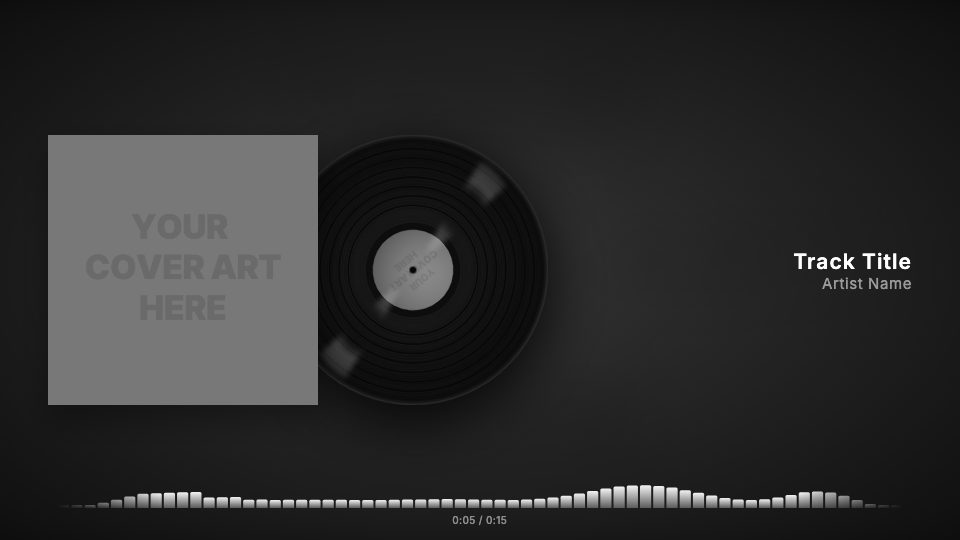
What the Music Player Video looks like
Cover and track info laid out for you
In 16:9 the cover sits on the left with the track and artist names on the right. In 4:5 and 1:1 the cover moves to the top with the names centered below it.
Five visualizer styles
Choose bars, mirrored bars, a flowing wave, dots or a simple progress bar along the bottom of the frame, in any color you pick.
Running time display
Under the visualizer, an elapsed and total time counter ticks along with the song, like a real player.
Sleeve, CD or vinyl
Show the plain cover, put the artwork on a spinning CD, or let a vinyl record slide out of the sleeve and turn.
Background from your artwork
By default the background is a blurred, darkened copy of your cover. You can replace it with your own image or video.
At a glance
- Format
- 16:9 · 1920 × 1080 px
- Best for
- YouTube
- Length
- Follows your track
- Also available in
- 9:16, 4:5, 1:1
- You need
- Cover art + audio (MP3, WAV, M4A or AAC)
- Software
- Your browser. No After Effects, no plugins
How to make a Music Player Video without After Effects
- 1
Upload your cover
Add the square artwork for the release. It is used for the cover and, unless you change it, for the blurred background.
- 2
Add the track
Upload an MP3, WAV, M4A or AAC file, then type the track title and artist name.
- 3
Pick a format and visualizer
Choose 16:9 for YouTube, 4:5 or 1:1 for Instagram, then pick the visualizer style and its color.
- 4
Export
Start the render. It runs in the cloud and you download an MP4 when it is ready.
When to use it
Full track uploads on YouTube
Put a song on your channel with moving visuals instead of a static image, without a separate video edit.
Instagram feed posts
Export the same track in 4:5 or 1:1 so it fills the feed instead of showing black bars.
Beat and instrumental channels
Producers can turn each new beat into a consistent, branded player video in a few minutes.
Album track-by-track uploads
Keep the same look across every song on a release and change only the audio and title.
FAQ
Is there a free music player After Effects template?
There are free projects around, but you still need After Effects to edit and render them. visuale lets you make the same kind of video in the browser with no Adobe software at all.
How long can the video be?
The Player template follows the length of your audio, so you can render a full song. Videos up to five minutes can be rendered.
Which sizes can I export?
16:9 at 1920×1080 for YouTube, 4:5 at 1080×1350 and 1:1 at 1080×1080 for Instagram posts. All export at 30 fps as MP4.
Can I customise the visualizer?
Yes. You can switch between bars, mirror, wave, dots and progress, and set the visualizer color to anything you like.
Can I change the fonts?
Yes. The track name and artist name each have their own font, size, weight and letter spacing settings.
Do I need to install anything?
No. Everything runs in your browser and the render happens in the cloud, so your computer does not have to process the video.
Skip the template download
Drop your cover, add your track and export your Music Player Video in about two minutes.
Make your Music Player Video