You Don't Need After Effects Templates to Make a Minimal Song Release Video
Soft fades, thin type and plenty of space around your cover, for releases that do not need noise.
Minimal After Effects templates look simple, but they are often the hardest to get right. Clean typography and slow fades leave nowhere to hide, so you end up nudging easing curves and letter spacing in the timeline until it stops feeling cheap.
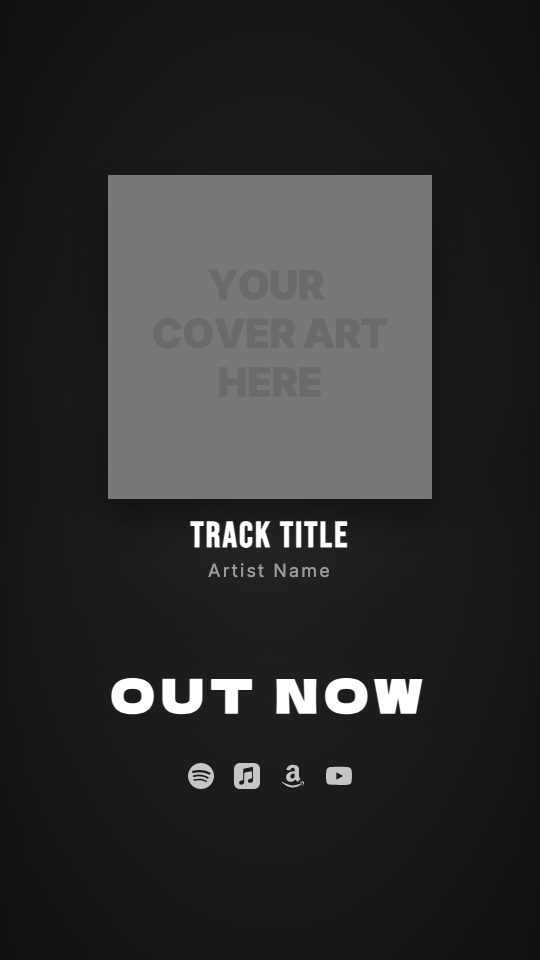
The Minimal look in visuale has those choices made already: light Montserrat and Inter type with wide letter spacing, a cover with a soft shadow and rounded corners, a still background and no particles. It suits acoustic, ambient, classical and singer-songwriter releases, and any artist whose brand is quiet.
Because nothing on screen competes with the artwork, it is also a good default when your cover already carries the design.
No After Effects, no plugins, no download.
After Effects template vs visuale
| After Effects template | visuale | |
|---|---|---|
| Typography setup | Install fonts, tune tracking and easing by hand | Light type and wide spacing preset |
| Software | After Effects, plus fonts the template expects | Browser only, fonts included |
| Cost | Adobe subscription, plus the template if paid | Free to start |
| Time to first video | Hours, mostly spent on small adjustments | About two minutes |
| Rendering | On your machine | In the cloud |
| Formats | Whatever the template was built at | Vertical 9:16, 1080 × 1920 |
What the Minimal Song Release Video looks like
Cover that fades in
No slide or bounce. The cover simply fades up, with a soft shadow and gently rounded corners.
OUT NOW that comes into focus
The OUT NOW label starts blurred and sharpens into place, set in light Montserrat with very wide letter spacing.
Quiet typography
Artist name in light Inter and track title in medium-weight Montserrat, both spaced out so the layout has room to breathe.
Still background, no FX
The blurred cover background does not move and no overlay sits on top, so attention stays on the artwork and the music.
At a glance
- Format
- 9:16 · 1080 × 1920 px
- Best for
- Stories, Reels, TikTok
- Length
- 15 seconds
- Also available in
- Vertical only
- You need
- Cover art + audio (MP3, WAV, M4A or AAC)
- Software
- Your browser. No After Effects, no plugins
How to make a Minimal Song Release Video without After Effects
- 1
Open the Minimal look
Use the button below. The editor opens with the fades, light fonts and still background preloaded.
- 2
Add your cover and titles
Upload your square cover and enter the artist and song names. Shorter titles suit this look best.
- 3
Select the 15 seconds
Upload the song and choose a passage that works without a big drop, like the first line of the chorus.
- 4
Add platforms, then export
Enable the streaming services you are on and export. You download an MP4 once the cloud render finishes.
When to use it
Acoustic and singer-songwriter releases
Keep the focus on the voice and the artwork.
Ambient, piano and classical
Slow, calm motion that does not fight the music.
Artists with a strong cover
Let detailed or typographic artwork carry the whole post.
A consistent feed
Use one restrained look for every single so your grid stays tidy.
FAQ
Is there a free minimal After Effects template for music?
Yes, several, but they still require After Effects and font setup. visuale gives you a minimal release video in the browser with the fonts built in.
Can I customize the fonts and spacing?
Yes. You can change the font, size, weight and letter spacing of the OUT NOW label, artist name and track title.
Can I add some movement later?
Yes. You can switch on a background animation or an FX overlay, or change the cover and text animations, at any point before export.
What size is the video?
Vertical 9:16 at 1080 × 1920 pixels, 30 fps, 15 seconds, exported as an MP4.
Can I change the "OUT NOW" wording?
Yes. The label is editable, so you can write something else, like the release date or "New single".
Skip the template download
Drop your cover, add your track and export your Minimal Song Release Video in about two minutes.
Make your Minimal Song Release Video